|
Using the CUI Console |
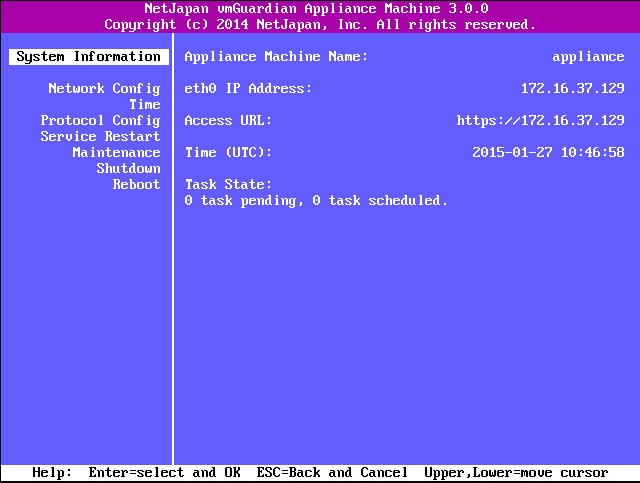
The CUI Console provides a character based console running on vmGuardian appliance machine. The CUI Console will automatically start when the vmGuardian appliance machine is powered on. The use of CUI Console allows you to perform operations necessary to configure required settings.
CUI Console may be operated as follows:
|
Key |
Operation |
|
Enter |
Select the respective items or OK |
|
Esc |
Back from the previous item or Cancel |
|
Arrow Key |
Shift to another item |
|
Operation |
Current status of vmGuardian appliance machine is displayed.
You can configure settings for IP address for the NIC interface connected to the vmGuardian appliance machine.
DNS
eth x
IP Address
Subnet Mask
Gateway
Time
You can synchronize vmGuardian appliance machine clock to current time (UTC).
NPT Server
Date / Time
Date - By default, appliance machine's BIOS date and time is used.
Time
HTTP or HTTPS may be selected for the protocol to connect to the vmGuardian appliance machine via Web browser.
Service Restart
Service running on the vmGuardian appliance machine may be restarted. The vmGuardian appliance machine itself does restart.
Maintenance
System related settings for the vmGuardian appliance machine are initialized.
Reset Web Root Password
The admin password is cleared. This is NOT the initial password.
After clearing, to set the new admin password for another user, add the user to administration.
Storage Device Unmount
Unmount all storage
Reset Network Interface
Sort alias to start from eth0
System Reset
When executed, the vmGuardian appliance machine will be shut down.
Change Host Name
You can change the appliance machine host name.
Shutdown
Shut down the vmGuardian appliance machine.
Reboot
Restart the vmGuardian appliance machine itself.