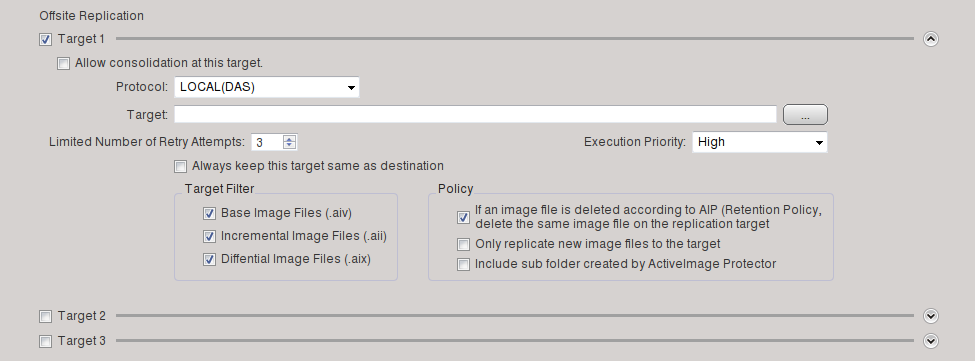
Enabling the [Offsite Replication] option in the Backup Wizard, replication of the backup image files to specified replication targets can be performed.
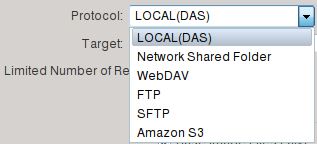
Up to three replication targets may be selected from the following types (protocol) and specified.
· FTP
· SFTP
* Progress of Offsite Replication process cannot be monitored in [Dashboard] - [Task] window or Status panel.
Behaviors of Replicator (aipreplicator) can be monitored by running "top" from terminal.
Before rebooting the system, make sure Replicator is stopped.
Rebooting the system in the middle of a replication process will forcefully terminate the process and will not be resumed when the system is rebooted.
* If Amazon S3 is specified for a replication target, please make sure that AWSCLI is installed and configured in the system. For more detailed information about how to configure AWSCLI, please visit Amazon Web Service.
* If a network shared folder is specified as the destination storage to save backup image, replication task fails in the environment where PING is returned with "Destination net unreachable" due to the result of a trial connection from a local system to the destination specified with the host name.
If this occurs, please specify the IP address for the destination storage, or mount the destination storage to the local system and specify the mount point.
* If WebDAV, FTP, or SFTP is selected for replication target, only single-byte alphanumeric characters can be used to specify the path to the destination storage to save image files or replication target locations.
1. Enable [Target 1].
Backup image files in an image file set at Destination storage vs. Replication Target are as follows:
Up to 3 Incremental backups are created.
|
Destination |
Replication Target |
|
Base |
Base |
|
Incremental 1 |
Incremental 1 |
|
Incremental 2 |
Incremental 2 |
|
Incremental 3 |
Incremental 3 |
Incremental backups numbered 1 to 3 are consolidated to Incremental 3 at the Replication Target.
|
Destination |
Replication Target |
|
Base |
Base |
|
Incremental 1 |
|
|
Incremental 2 |
|
|
Incremental 3 |
Incremental 3 |
Incremental 4 is created (Only Incremental 4 is replicated.)
|
Destination |
Replication Target |
|
Base |
Base |
|
Incremental 1 |
|
|
Incremental 2 |
|
|
Incremental 3 |
Incremental 3 |
|
Incremental 4 |
Incremental 4 |
As listed above, the image file set at the Replication Target contains only randomly discrete image files.
However, the continuity of the files is retained, so that Incremental 4 can be selected to execute a variety of operations.
3. Select the type of replication target from the pull-down list.
Specify the number of replication retry attempts and execution priority to the specified target.

The types of replication targets are as follows.

Click [...] to select the target.

Click [...] to select the target. The credentials entered to set up the replication target are used.

Enter the path including the host and folder name for the Replication Target.
The port number may be changed, if necessary.
URL may be specified, including the folder path in [Target].
[http:] for Protocol and port [80] are specified by default.
"https" protocol may be selected.
When the settings for the Replication Target are configured, click [Credentials] to enter credentials information required to access the target.

Click [Check] to make sure that the specified credentials are valid.

Enter the path including the host and folder name for the Replication Target.
The port number may be changed, if necessary.
URL may be specified, including the folder path in [Target].
Port [21] is specified by default.
When the settings for the Replication Target are configured, click [Credentials] to enter credentials information required to access the target.
Click [Check] to make sure that the specified credentials are valid.

Enter the path including the host and folder name for the Replication Target.
The port number may be changed, if necessary.
URL may be specified, including the folder path in [Target].
Port [22] is specified by default.
When the settings for the Replication Target are configured, click [Credentials] to enter credential information required to access the target.
Select "Password" or "Private Key" for [Authentication].

Please enter [User Name] and [Password] for credentials.

Please enter [Private key file], [User Name], [Passphrase] for credentials.
Click [Check] to confirm that the specified credentials are valid.

Please specify [Bucket], [Region] and [Folder] path. Or, specify the path including folder path for [Bucket].
It is recommended to specify [Region] for the specified bucket. If the specified region was irrelevant to the specified bucket, replication should be executed, however, processing may take longer.
When the settings for the replication target are configured, click [Credentials] and enter credentials ([Access Key] and [Secret Access Key]).
For more detailed information about how to get Access Key ID and Secret Access Key, please visit Amazon Web Service.

Click [Check] to confirm that the specified credentials are valid.
4. Specify replication options.

The following are the Replication options.
The replication target is synchronized with the destination storage.
When this option is enabled, [Target Filter] and [Policy] are disabled.
Ex: When the user deletes an image file from the destination storage, the same file is deleted in the replication target.
The image files of the specified type are replicated.
You can select a policy for replicating image files.
|
Item |
Description |
| Replicate only newly created image files. | Image files newly created in storage are replicated to the target.Image files created according to the schedule created before this option was enabled are not replicated. |
| Replicate only new generation set to the target. | Only the newly generation set is replicated to the target. |
| Create a sub-folder in the replication target and replicate image files in the sub-folder. | Select this option to create a sub-folder in replication target before replicating image files. |
5. If necessary, configure the settings for the target 2 and / or target 3, and click [Done].